Klyn discovers named agents (assistants) on supported LangGraph Agent Server deployments, applies policy to integrated tool actions before they execute, and keeps a record of the decision and reported outcome. LangChain agents hosted through Agent Server can use the same approach.
A support agent needs to read a customer’s case. Closing that case is a different decision: it could end an investigation before the customer’s problem is solved. Yet both operations may use the same application credentials.
Klyn lets a team make that distinction at the point of action. First, it identifies the assistant and its runtime. Then it checks each protected operation against policy and records the decision. The agent can be allowed to read a case without being allowed to close it.
The following sections describe how AI agent governance, AI Agent Identity and tool call authorization are managed by Klyn.
How does Klyn discover LangGraph agents?
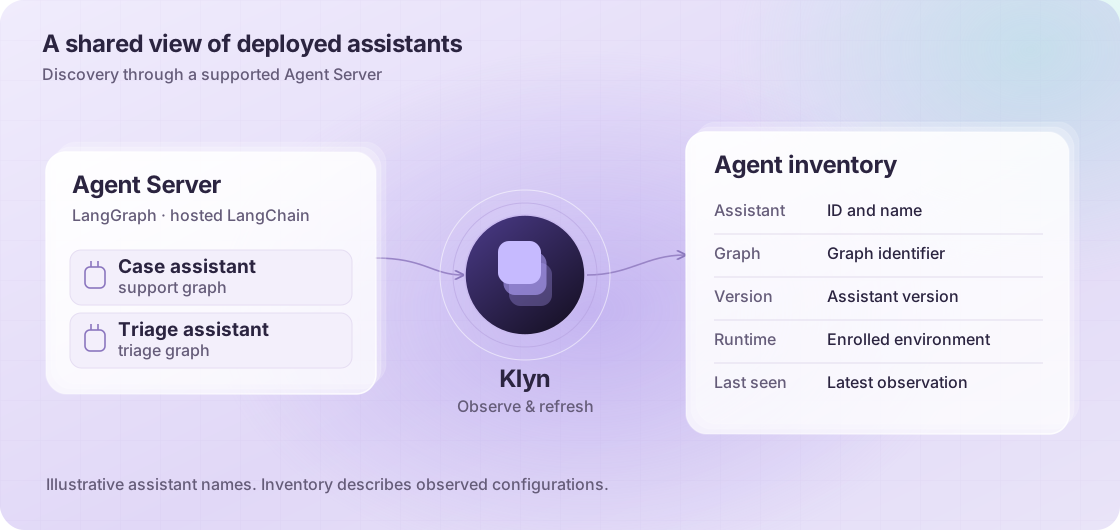
Klyn queries a supported Agent Server’s APIs for its named assistant configurations. It captures the assistant’s identity and name, the graph it uses, its version, and the runtime environment where it was observed. Repeated observations keep the inventory current.
Security and platform teams can distinguish assistants that use the same graph, see which runtime each belongs to, and check when each was last observed.
A LangChain agent exposed as a named assistant through Agent Server can follow this path too. A standalone script needs an explicit inventory integration; Klyn does not infer every custom agent from the presence of a framework dependency.
How does Klyn govern agent actions?
An administrator enrolls the runtime environment and selects its base policy. Eligible discovered LangGraph assistants inherit that policy. An individual assistant can receive a different published policy, while enterprise policy limits still apply.
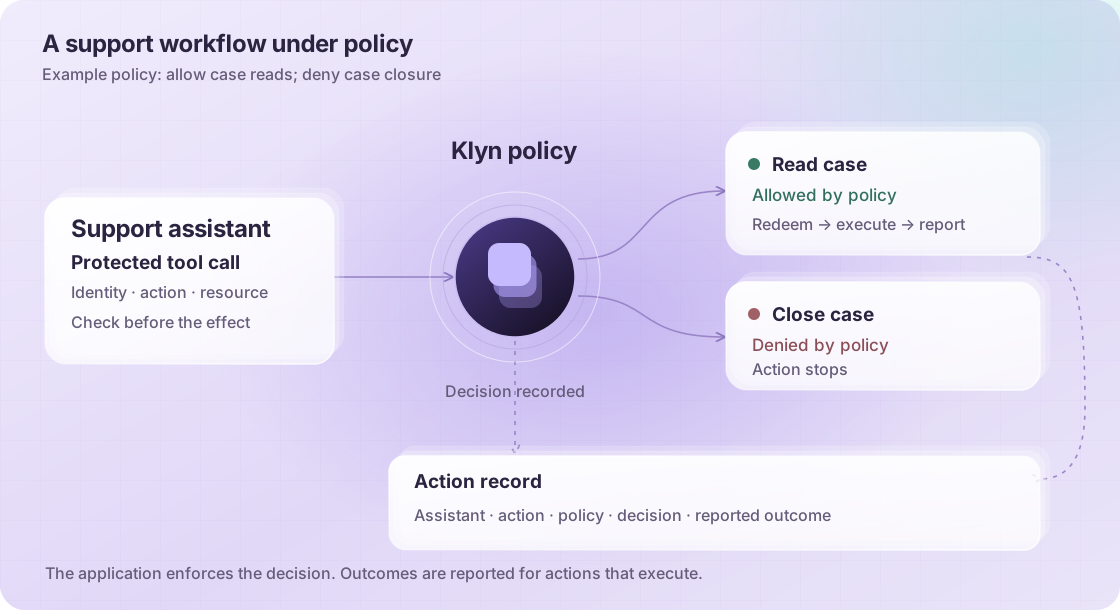
The control sits at the protected tool call. Before the application reads or changes a resource, its Klyn integration submits the assistant identity, requested action, target resource, and relevant arguments for a decision.
If allowed, the integration receives a short-lived authorization bound to that request. It must redeem that authorization before executing the action. Reusing it or changing the request cannot turn one permission into another.
If policy denies the request, or AI agent authorization cannot be confirmed, the integrated action stops. After execution, the runtime reports the outcome to Klyn.
This requires an execution integration around the protected tools. Adding an assistant to an inventory does not, by itself, put its calls under policy, or policy enforcement.
What would this look like in a support workflow?
Suppose the policy allows an assistant to read cases but denies case closure.
When the assistant requests a case read, the integration checks with Klyn and proceeds after authorization is confirmed. If the assistant later requests closure, that is a separate action with a separate decision. The earlier read permission does not authorize the write.
The same principle applies to a longer LangGraph workflow. A data lookup, a record update, and a notification are separate effects. Each protected operation needs its own policy check, including operations reached through branches or subagents.
For a production workflow, downstream access must go through those controls. An unprotected SDK call using the same credentials would leave a route around them.
What evidence can a team inspect?
Klyn connects the inventory to action records so a reviewer can follow a request from the assistant to its policy decision.
| Question | Evidence available in Klyn |
|---|---|
| Which assistant was observed? | Assistant identity, name, graph, version, runtime, and last-seen information |
| Why did an action proceed or stop? | Requested action and resource, allow/deny decision, and policy deployment and version |
| Was the authorization used? | A record of authorization consumption before the protected action |
| What happened afterwards? | The runtime’s reported success or failure, when delivered |
These distinctions matter during an investigation. An allowed request is not the same as a completed change. A consumed authorization with no reported outcome needs follow-up. The record preserves those differences instead of treating every allow as a successful execution.
What changes in your deployment?
Start with a workflow your team understands. Connect its supported runtime, confirm the assistant inventory, select a restrictive policy, and integrate the tools that read or change business data. Then test an allowed action and a denied one, and inspect the records for both.
You can keep the LangChain or LangGraph workflow. The engineering work is at the runtime connection and protected action boundaries, with coverage expanding as more tools are integrated.
Common questions
Can Klyn discover standalone LangChain agents?
Standalone scripts need an explicit inventory integration. LangChain agents hosted as named assistants on supported Agent Server deployments can use the LangGraph discovery path. Imported custom-agent records are inventory-only; importing a record does not make it a governed LangGraph assistant.
Can Klyn block a LangGraph tool call?
Yes, when that call passes through the Klyn execution integration. The application checks policy and confirms authorization before performing the protected action. Calls outside that path need their own integration.
Does Klyn replace LangChain or LangGraph?
No. LangChain and LangGraph provide the application and workflow framework. Klyn adds an inventory and a policy decision boundary around integrated actions, with records security teams can review. LangChain’s tool and middleware interfaces provide places to implement these controls.
Bring one workflow
Pick an agent that can change something important: a support case, a customer record, or a deployment. Book a Klyn demo to walk through how it is discovered, where its actions should be checked, and what your team can inspect afterwards.